Monthly Archives: December 2025

[lazy admin writings] Backporting a deb package with Debian Linux

More recent yt-dlp versions (direct download ones) are complaining about EJS and warn that the build-in solution in yt-dlp will be deprecated. I wanted to prepare for this future deprecation so I had looked at the options before. The recommended one is Deno but I prefer to install from deb packages as much as possible and Deno could not be found in the Debian packages repositories. Then I had noticed that QuickJS (by the software genius Fabrice Bellard) is in the repositories but only from Debian Trixie and newer. The computer I use yt-dlp has Debian Bookworm and I’m not yet ready or too lazy or some such to make the jump from Bookwork to Trixie now.

What to do ? First I thought about apt-pinning which worked nice many years ago but in more recent years my experience with it was a bit too messy or chaotic. Chaos is fine but not too often 😉 So what then ?

Go Go Gadget! Backporting.

Years ago I had used backporting several times with Debian even for packages with a lot dependencies which meant backporting several other programs and libraries that the package depended on.

With QuickJS I expected things to be easy because Fabrice Bellard is a programmer which appears to avoid bloat and wants to use every bit as efficient as possible.

After a search engine search I quickly found what I needed, this page :

https://debian-handbook.info/browse/stable/debian-packaging.html

Let’s summarize how this backporting was a  success :

I made sure I had compile tools installed.

# apt install build-essential

(# implies sudo or su to temporary have root privileges $ implies regular user)

Then installed the devscripts deb and one of the suggestions (dh-make) which I am not sure that it was actually needed :

# apt install devscripts dh-make

In /etc/apt/sources.list I added one new line (without the #)  :

# deb-src http://deb.debian.org/debian/ trixie main contrib non-free

Then ran # apt update

As regular user :

$ apt source quickjs

After this command had downloaded the source, navigate into the new directory.

$ cd quickjs-2025.04.26/

Now an optional step which you can omit.

$ dch –local +falcot

Then the big moment. I still was not sure whether it needed more dependencies so this could fail.

$ dpkg-buildpackage -us -uc

And the compiling started and finished well.

The result were in the directory above (After compiling it will also mention that)

it resulted among other in two deb files : quickjs_2025.04.26-1_amd64.deb and libquickjs_2025.04.26-1_amd64.deb

The final step of backporting and installing :

# dpkg -i quickjs*deb libquickjs_2025.04.26-1_amd64.deb

That looked good, no errors.

Then the first new step with yt-dlp :

$ yt-dlp_linux –js-runtimes quickjs:/bin/qjs [and YouTube link here]

(Syntax following :  https://github.com/yt-dlp/yt-dlp/wiki/EJS)

And there it was in the yt-dlp output, the final verdict, it worked! :

[youtube] [jsc:quickjs] Solving JS challenges using quickjs

[info] [YT-link part]: Downloading 1 format(s): 135+251

Of course this will be more difficult or even very difficult or almost impossible if the package you’d like to backport has many dependencies but

you never know unless you try! 🙂


A subjective review of CachyOS installations

I’d seen the name CachyOS popping up before but only when I saw it is ArchLinux based and optimized for speed my curiosity put it on top of my wish list.

Tried it on one computer, installation was pretty smooth although I didn’t like their default KDE based installer which felt sluggish. After installation I tested Cinnamon and Gnome desktop and I was impressed by its snappy performance.

Tried it on another computer, a considerable slower computer, and on that one the CachyOS installer kept failing during partitioning and formatting. I tried the text based installer and the GUI based installer several times, tried ext4 instead of the default btrfs, and even pre-formatted but it kept failing with errors that didn’t make sense to me. And I didn’t want to spend more time on it. After this setback I went for a plain Arch Linux installation on the very same computer and that went fine.[1]

Conclusion :

Pros (subjective, personal) :

  •  Fish shell as default
  •  Has aliases for ls with eza (the successor of exa)
  • Feels snappy
  • Output of eza shows the icons as it should (Unlike all the recent installations I did among other with Debian, Linux Mint (Ubuntu and Debian based flavors) and I believe also plain ArchLinux.

Cons : None yet.

Here’s the list of aliases it comes with.

alias .. ‘cd ..’
alias … ‘cd ../..’
alias …. ‘cd ../../..’
alias ….. ‘cd ../../../..’
alias …… ‘cd ../../../../..’
alias apt ‘man pacman’
alias apt-get ‘man pacman’
alias cleanup ‘sudo pacman -Rns (pacman -Qtdq)’
alias dir ‘dir –color=auto’
alias egrep ‘egrep –color=auto’
alias fgrep ‘fgrep –color=auto’
alias fish_vi_dec ‘fish_vi_inc_dec dec’
alias fish_vi_inc ‘fish_vi_inc_dec inc’
alias fixpacman ‘sudo rm /var/lib/pacman/db.lck’
alias gitpkg ‘pacman -Q | grep -i “\\\\-git” | wc -l’
alias grep ‘grep –color=auto’
alias grubup ‘sudo grub-mkconfig -o /boot/grub/grub.cfg’
alias hw ‘hwinfo –short’
alias jctl ‘journalctl -p 3 -xb’
alias la ‘eza -a –color=always –group-directories-first –icons’
alias ll ‘eza -l –color=always –group-directories-first –icons’
alias ls ‘eza -al –color=always –group-directories-first –icons’
alias lt ‘eza -aT –color=always –group-directories-first –icons’
alias mirror ‘sudo cachyos-rate-mirrors’
alias please sudo
alias psmem ‘ps auxf | sort -nr -k 4’
alias psmem10 ‘ps auxf | sort -nr -k 4 | head -10’
alias tarnow ‘tar -acf ‘
alias tb ‘nc termbin.com 9999’
alias untar ‘tar -zxvf ‘
alias update ‘sudo pacman -Syu’
alias vdir ‘vdir –color=auto’
alias wget ‘wget -c ‘

[1] And that made me wonder : Surely an existing ArchLinux installation can be converted into a CachyOS installation 🙂

4get a proxy search engine

For years I have used a certain SearXNG instance as proxy search engine with great pleasure. As a miracle it gave me good enough search results I needed all the time. But one moment in time it stopped working well or not at all and other SearXNG instances didn’t perform good enough for what I needed. Then I started to be happy with Mullvad’s Leta search engine. Till the day that Mullvad announce they could no longer keep up with the changes and had to shut it down. For a while I reverted to the noai of DuckDuckGo but I also found (via a Lemmy post) a search engine I never heard of : 4get.

Here’s the source code with some README :

https://git.lolcat.ca/lolcat/4get

Here’s an instances health overview :

https://4get.ca/instances

So far my search results are pretty good and sometimes remarkably good. There’s one catch. When it shows Wikipedia pages in the search results it shows the web link as a sort of bread crumbs. If you are not aware of it you should just click on the very right of the link so you end up at the correct Wikipedia page.

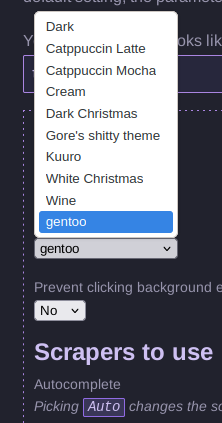
Just like SearXNG you can change settings of 4get.

Here an example of the theme options.

Theme options with 4get using the gentoo theme colors

detox : A “lazy” way to remove spaces in filenames in Linux

There’s several ways to remove spaces from file names. For other options see this post that I found with a search engine search.

In this writing I’ll write about an easy way with a tool called detox.

On Debian/Ubuntu/Linux Mint or any other Debian or Devuan based Linux, open a terminal and type or copy&paste :

sudo apt-get install detox

After that, if you want to remove spaces from all your ODT (LibreOffice) files, type :

detox *odt

After this is done for example your “Notes from last night’s meeting.odt” will be renamed to “Notes_from_last_night_s_meeting.odt” or something like that.

There’s some exceptions that detox will not be able to convert.

If you did save your file like this for example  :

“‘Notes from today’s meeting.odt'” detox will not succeed. The combination of the ‘ and ” characters are a show stopper.

If you want to learn more about detox command-line options, for example the recursive and the dry-run option, type :

detox -h

Have a nice “lazy” detox day!