All posts by voltooidverledentijd

On Violence

For many months I have been wanting to write this. Thinking about it but never started because the whole story did not seem to be finished but now I will just start and write it in parts. My main reason to write this is because of a teacher at university in the Netherlands attacking and pressured for his anti Israel remarks.

So, let’s start :

What is violence ? 

Do you have your own definition of violence ?

Did you learn at school a definition of violence ?

Did you parents, caretakers, family or friends tell you a definition of violence ?

Or did you never think about it and maybe accepted what is happening year by year from the state violence, the only accepted violence ?

Is it violence when polluting companies destroy the planet in slow motion ?

Is it violence to let people live in increasing poverty while the rich get richer ?

Is it violence to exploit minerals in so-called underdeveloped countries and give nothing valuable really in return ?

Is it violence to not punish corrupt politicians and lobby groups ?

Is death penalty, like in some states in the USA, violence ?

Is torture and life sentence violence ?

Is pushing for more cars, more tobacco, more pesticides, more fossil fuel usage, violence ?

Is capitalism violent by nature ?

Let’s look back at the 9/11 Twin Towers attacks. Did you go with the visual impact roller-coaster from the Western mainstream media who were in shock ?

What did I do after those attacks ? I thought about it again and again and while I do condemn the killings of every human being and every needless killing of animals as well, I do see it as a big orchestrated thing, an almost “genius” thing so big that it is hard to believe there was no involvement from three letter secret agencies. And note the symbolism. This was done on September 11, which is also known as 9/11 which is the alarm phone number in the USA. Compare that with the abduction of Maduro of Venezuela on 3rd of January 2026, and then see what happened 3rd of January 1990. A fetish for numbers ? Coincidence ?

The visual impact of the 9/11 attacks wiped out all the past visual impact from the awfull USA past, the countless toppling of country leaders, the countless killings of people abroad and inside the USA. Except that the visual impact and the impact of words was usually diminished by most of mainstream media. In a time that video on mobile phones, TVs and computer possibly had more impact on a lot of people already.

Why mention the 9/11 attacks ? Because I’d like to compare it with the beeper attacks against Hezbollah in the last few years. Again it was a big orchestrated thing that definitely involved Israel’s Mossad. And what was in the mainstream newspapers in the Netherlands ? It looked like journalists were almost not able to suppress their admiration of the genius attack of the enemy. They didn’t mention the word enemy but it is business as usual here. The USA, the supposed self-acclaimed “Land of the Free, Home of the Brave” and “From paperboy to millionaire” worshiping.

The “Palestinian terrorists brutally murdered Israeli soldiers” or “Palestinians killed by air attacks. Israeli prime minister proud” is a choice of words which is considered “normal” in Western media.

And that makes me wonder about what I have been asking myself since years :

What is normal ? 

Is normal a static thing or a dynamic thing that can change one day to the other ?

Nobody every told me what normal is, not at school, not at the family, not with friends.

Yet I have heard parents in the streets snapping at their child in Dutch “Doe normaal!” which is “Behave!”. It is an abstract thing it seems but I guess it simply means “Shut up! Be quiet!”.

Children full of life eventually become introverts because we’re all so busy and in a hurry.

Every day we live in a world full of violence.

Some thinkers and philosophers mention that almost all people are violent because we live in duality, we live with conflict inside. Only very few manage to escape from the duality and break free.

Do we have a lot to learn ?

Do we have time ? Can we free up some time to re-evaluate and do better ?

To be continued, maybe.

 

Testing PostmarketOS and Waydroid on a desktop : a fancy Linux tablet

Installing PostmarketOS on a desktop computer because I wanted to test it.

The installation process was a bit sparse but surprisingly simple and straightforward.

Using a terminal and the tail command to follow the installation log was useful because I got confused about why the installation took longer than expected.

After that was done it turned out to be a plain Gnome desktop with Alpine Linux underneath it. For some reason I had expect a mobile OS to have a dialer app but then I remembered that it does not come with one ISO installer file but specific ones for devices.

Installing Waydroid was also pretty easy for me because I had experience with that. I can imagine that when Waydroid is brand new for you it can take some time to get it up and running because it can be a little rough at the edges sometimes.

As usual the ArchLinux wiki (yes, ArchLinux) can be useful no matter which Linux distribution you are running. In this case https://wiki.archlinux.org/title/Waydroid#Usage

$ waydroid session start

and

$ waydroid show-full-ui

can be two useful commands to know about for Waydroid.

Using adb with Waydroid can be useful.

https://docs.waydro.id/faq/using-adb-with-waydroid

Conclusion : If you have a laptop with touchscreen installing PostmarketOS and Waydroid can be beneficial and rewarding depending on your goals.

I’ve seen some people complain about Alpine Linux using “apk add <package name>” (unlike the expected “apk install <package name>”) but this can’t be a show stopper.

Of course you can probably install any Linux distribution on a laptop with touchscreen and have Waydroid on it as a Linux tablet but if you would want to volunteer to help with the development of PostmarketOS maybe this is the way.

[lazy admin writings] Backporting a deb package with Debian Linux

More recent yt-dlp versions (direct download ones) are complaining about EJS and warn that the build-in solution in yt-dlp will be deprecated. I wanted to prepare for this future deprecation so I had looked at the options before. The recommended one is Deno but I prefer to install from deb packages as much as possible and Deno could not be found in the Debian packages repositories. Then I had noticed that QuickJS (by the software genius Fabrice Bellard) is in the repositories but only from Debian Trixie and newer. The computer I use yt-dlp has Debian Bookworm and I’m not yet ready or too lazy or some such to make the jump from Bookwork to Trixie now.

What to do ? First I thought about apt-pinning which worked nice many years ago but in more recent years my experience with it was a bit too messy or chaotic. Chaos is fine but not too often 😉 So what then ?

Go Go Gadget! Backporting.

Years ago I had used backporting several times with Debian even for packages with a lot dependencies which meant backporting several other programs and libraries that the package depended on.

With QuickJS I expected things to be easy because Fabrice Bellard is a programmer which appears to avoid bloat and wants to use every bit as efficient as possible.

After a search engine search I quickly found what I needed, this page :

https://debian-handbook.info/browse/stable/debian-packaging.html

Let’s summarize how this backporting was a  success :

I made sure I had compile tools installed.

# apt install build-essential

(# implies sudo or su to temporary have root privileges $ implies regular user)

Then installed the devscripts deb and one of the suggestions (dh-make) which I am not sure that it was actually needed :

# apt install devscripts dh-make

In /etc/apt/sources.list I added one new line (without the #)  :

# deb-src http://deb.debian.org/debian/ trixie main contrib non-free

Then ran # apt update

As regular user :

$ apt source quickjs

After this command had downloaded the source, navigate into the new directory.

$ cd quickjs-2025.04.26/

Now an optional step which you can omit.

$ dch –local +falcot

Then the big moment. I still was not sure whether it needed more dependencies so this could fail.

$ dpkg-buildpackage -us -uc

And the compiling started and finished well.

The result were in the directory above (After compiling it will also mention that)

it resulted among other in two deb files : quickjs_2025.04.26-1_amd64.deb and libquickjs_2025.04.26-1_amd64.deb

The final step of backporting and installing :

# dpkg -i quickjs*deb libquickjs_2025.04.26-1_amd64.deb

That looked good, no errors.

Then the first new step with yt-dlp :

$ yt-dlp_linux –js-runtimes quickjs:/bin/qjs [and YouTube link here]

(Syntax following :  https://github.com/yt-dlp/yt-dlp/wiki/EJS)

And there it was in the yt-dlp output, the final verdict, it worked! :

[youtube] [jsc:quickjs] Solving JS challenges using quickjs

[info] [YT-link part]: Downloading 1 format(s): 135+251

Of course this will be more difficult or even very difficult or almost impossible if the package you’d like to backport has many dependencies but

you never know unless you try! 🙂


A subjective review of CachyOS installations

I’d seen the name CachyOS popping up before but only when I saw it is ArchLinux based and optimized for speed my curiosity put it on top of my wish list.

Tried it on one computer, installation was pretty smooth although I didn’t like their default KDE based installer which felt sluggish. After installation I tested Cinnamon and Gnome desktop and I was impressed by its snappy performance.

Tried it on another computer, a considerable slower computer, and on that one the CachyOS installer kept failing during partitioning and formatting. I tried the text based installer and the GUI based installer several times, tried ext4 instead of the default btrfs, and even pre-formatted but it kept failing with errors that didn’t make sense to me. And I didn’t want to spend more time on it. After this setback I went for a plain Arch Linux installation on the very same computer and that went fine.[1]

Conclusion :

Pros (subjective, personal) :

  •  Fish shell as default
  •  Has aliases for ls with eza (the successor of exa)
  • Feels snappy
  • Output of eza shows the icons as it should (Unlike all the recent installations I did among other with Debian, Linux Mint (Ubuntu and Debian based flavors) and I believe also plain ArchLinux.

Cons : None yet.

Here’s the list of aliases it comes with.

alias .. ‘cd ..’
alias … ‘cd ../..’
alias …. ‘cd ../../..’
alias ….. ‘cd ../../../..’
alias …… ‘cd ../../../../..’
alias apt ‘man pacman’
alias apt-get ‘man pacman’
alias cleanup ‘sudo pacman -Rns (pacman -Qtdq)’
alias dir ‘dir –color=auto’
alias egrep ‘egrep –color=auto’
alias fgrep ‘fgrep –color=auto’
alias fish_vi_dec ‘fish_vi_inc_dec dec’
alias fish_vi_inc ‘fish_vi_inc_dec inc’
alias fixpacman ‘sudo rm /var/lib/pacman/db.lck’
alias gitpkg ‘pacman -Q | grep -i “\\\\-git” | wc -l’
alias grep ‘grep –color=auto’
alias grubup ‘sudo grub-mkconfig -o /boot/grub/grub.cfg’
alias hw ‘hwinfo –short’
alias jctl ‘journalctl -p 3 -xb’
alias la ‘eza -a –color=always –group-directories-first –icons’
alias ll ‘eza -l –color=always –group-directories-first –icons’
alias ls ‘eza -al –color=always –group-directories-first –icons’
alias lt ‘eza -aT –color=always –group-directories-first –icons’
alias mirror ‘sudo cachyos-rate-mirrors’
alias please sudo
alias psmem ‘ps auxf | sort -nr -k 4’
alias psmem10 ‘ps auxf | sort -nr -k 4 | head -10’
alias tarnow ‘tar -acf ‘
alias tb ‘nc termbin.com 9999’
alias untar ‘tar -zxvf ‘
alias update ‘sudo pacman -Syu’
alias vdir ‘vdir –color=auto’
alias wget ‘wget -c ‘

[1] And that made me wonder : Surely an existing ArchLinux installation can be converted into a CachyOS installation 🙂

4get a proxy search engine

For years I have used a certain SearXNG instance as proxy search engine with great pleasure. As a miracle it gave me good enough search results I needed all the time. But one moment in time it stopped working well or not at all and other SearXNG instances didn’t perform good enough for what I needed. Then I started to be happy with Mullvad’s Leta search engine. Till the day that Mullvad announce they could no longer keep up with the changes and had to shut it down. For a while I reverted to the noai of DuckDuckGo but I also found (via a Lemmy post) a search engine I never heard of : 4get.

Here’s the source code with some README :

https://git.lolcat.ca/lolcat/4get

Here’s an instances health overview :

https://4get.ca/instances

So far my search results are pretty good and sometimes remarkably good. There’s one catch. When it shows Wikipedia pages in the search results it shows the web link as a sort of bread crumbs. If you are not aware of it you should just click on the very right of the link so you end up at the correct Wikipedia page.

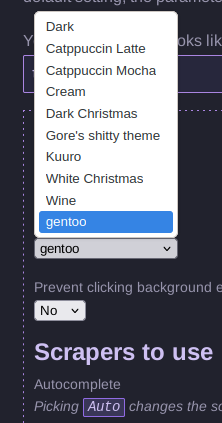
Just like SearXNG you can change settings of 4get.

Here an example of the theme options.

Theme options with 4get using the gentoo theme colors

detox : A “lazy” way to remove spaces in filenames in Linux

There’s several ways to remove spaces from file names. For other options see this post that I found with a search engine search.

In this writing I’ll write about an easy way with a tool called detox.

On Debian/Ubuntu/Linux Mint or any other Debian or Devuan based Linux, open a terminal and type or copy&paste :

sudo apt-get install detox

After that, if you want to remove spaces from all your ODT (LibreOffice) files, type :

detox *odt

After this is done for example your “Notes from last night’s meeting.odt” will be renamed to “Notes_from_last_night_s_meeting.odt” or something like that.

There’s some exceptions that detox will not be able to convert.

If you did save your file like this for example  :

“‘Notes from today’s meeting.odt'” detox will not succeed. The combination of the ‘ and ” characters are a show stopper.

If you want to learn more about detox command-line options, for example the recursive and the dry-run option, type :

detox -h

Have a nice “lazy” detox day!


Hoe voeg je DuckDuckGo (noai) toe aan Firefox

Ga naar Instellingen

Ga naar Zoeken 

Blader naar beneden naar Zoeksnelkoppelingen

Klik op Toevoegen (Onder het vierkant en naast Standaardzoekmachines terugzetten)

Vul een naam in bij het veld Naam zoekmachine (Bijvoorbeeld : DDG noai)

In het veld met URL met %s op de plaats van de zoekterm vul je in :

https://noai.duckduckgo.com/search?q=%s

Klik daarna op Zoekmachine opslaan

Blader naar boven naar Standaardzoekmachine

en maak DDG noai de standaard.

Meer informatie over DDG noai hier :

https://duckduckgo.com/duckduckgo-help-pages/ai-features/about-noaiduckduckgocom

If you’d prefer an AI-free DuckDuckGo Search experience, start your searches on noai.duckduckgo.com instead of on duckduckgo.com. Searching on noai.duckduckgo.com works the same as search on duckduckgo.com, except all AI features are turned off and AI-generated images are filtered out of results by default.

How to add DuckDuckGo (noai) to Firefox

Go to Settings

Go to Search 

Scroll down to Search Shortcuts

Click on Add (under the box and next to Restore Default Search Engines)

Fill in a name in the field with Search Engine Name (For example : DDG noai)

In the field with URL with %s in place of search term fill in :

https://noai.duckduckgo.com/search?q=%s

Scroll up to the top of the page to Default Search Engine

and make DDG noai the default.

More information about DDG noai here :

https://duckduckgo.com/duckduckgo-help-pages/ai-features/about-noaiduckduckgocom

If you’d prefer an AI-free DuckDuckGo Search experience, start your searches on noai.duckduckgo.com instead of on duckduckgo.com. Searching on noai.duckduckgo.com works the same as search on duckduckgo.com, except all AI features are turned off and AI-generated images are filtered out of results by default.

Testing Galene videoconference server software

During the Covid-19 pandemic Jitsi-Meet was one of the more popular software among some people for videoconference calls. However, Jitsi-Meet is not very secure. If people choose a very simple room name and no password then it can happen that suddenly strangers join your video call. Self-hosting and maintaining Jitsi-Meet is also not super easy.

Galene is different because it comes with the feature to create users, and users can have operate privileges to create invite links for other users. The invite links can be time limited.

I’ve tested self-hosting Galene and I was happy to see that it ran pretty well on moderate hardware (VPS with 1 GB RAM, with a swap file. Using Debian Linux as OS).

The question remains how many calls and users it can handle very well.

Galene has community provided packages for Yunohost, Arch Linux (AUR) and FreeBSD. A drawback of Galene is that it appears to be a one person project but there’s many one person projects and software can be forked when a project becomes dormant for some reason.

Off-topic : On the same VPS I’ve also installed Prosody with Yunohost and after getting the DNS settings right, as suggested by Yunohost, video-calls with Conversations IM app worked out of the box. Very cool! Thank you people at Yunohost!!! :)))

Hints about Yunohost + Nextcloud Office

Some short hints. This is not a complete howto (yet). It assumes that you are running Yunohost and you did install Nextcloud and you remembered or wrote down which of your Yunohost users was made admin for your Nextcloud installation.

nano /etc/php/8.3/fpm/pool.d/nextcloud.conf

Change the 128 of php_admin_value[memory_limit] = 128M into 512. And ignore the read-only warning.

sudo /etc/init.d/php8.3-fpm restart

Login as admin of the Nextcloud installation.

At the Apps section install : Collabora Online – Built-in CODE Server and the Nextcloud Office (RichDocuments).

Login with ssh, and :

sudo -u nextcloud bash

cd /var/www/nextcloud

php –define apc.enable_cli=1 occ richdocuments:activate-config

At this point perhaps a reboot or a restart of certain services is needed.

/happy YH! 🙂