Tag Archives: linux

Annoyances fixed (1)

Since a long time I was annoyed about the blurred screenshots on my Linux computer. I like Flameshot. It allows to make a screenshot and then draw circles or squares or insert some text, use a marker. But just like with the PrintScreen button on the keyboard it gives blurred screenshots.

<inserting blurred screenshot made with Flameshot>
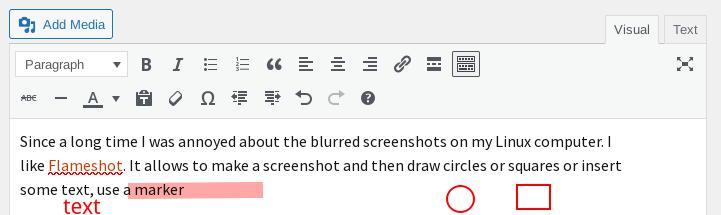
Example of a Flameshot screenshot showing a new blog post in progress.

A few days ago I found enlightenment with the good old (old school) scrot command line tool, which gives no such blurring.

I already had a script for scrot made a long time ago but didn’t use it very often :

#!/bin/sh
/usr/bin/scrot -d 5 -e 'mv $f ~/Pictures'

<inserting screenshot made with scrot>
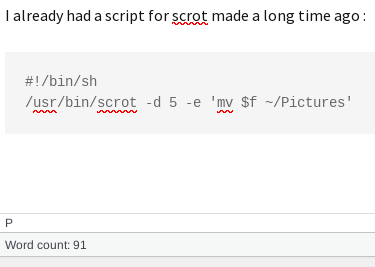
Example of a screenshot made with scrot tool showing a new blog post in progress

See the shiny difference ?

Drawback is that I need to crop the result manually but since it is only for uploading to Mastodon, which I don’t do very often, this is OK for now.

Years ago I used Shutter to screengrab but the development of that was stalled (Cause sometimes there’s for example GKT3 -> GTK4 or Python2 -> Python3 migrations needed for a programmer and that can take a lot of time. I think this was the case with Shutter too) and I stopped using it. It is back though. Maybe I’ll try that again too.


A little Linux “commandlinefu” fun to share – for geeks & nerds

Let’s imagine that you wanted to make Proton Drive work in Linux because the people from Proton only appears to provide Proton Drive apps for MacOS, iOS, Windows and Android. And you found this blog post Sync Proton Drive on Linux with Rclone and you went ahead without reading all that carefully first and created a new folder

~/ProtonDrive

Then after reading some more (and you see that you need to first configure rclone), you realize you were pretty tired already and wanted to do other things, including this wonderful thing called sleep.

And you think “Let’s remove that new folder” so I will not be distracted by that tomorrow when I’m busy with other computer things.

You type in :

rm ~/ProtonDrive

And you get an error because it is a directory and the rm command needs more powers from you to be able to remove a directory.

Now instead of getting annoyed and wanting to remove all that you had typed in, you can simply add the needed “minus rf” to what you already typed, so it will look like this :

rm ~/ProtonDrive -rf

You see ? Linux can often be very flexible.

And how do I know this ? I liked to experiment and do crazy things in the past, e.g. testing whether little Linux tools would use -h or –help and whether –hel would also work and for some tools it turned out it really DID. Now that I’m a bit older I don’t do that anymore (jk).

I mentioned commandlinefu in the title, here’s a site only about real commandlinefu :

https://www.commandlinefu.com/commands/browse